P8YPlatforms · No. 072
Play8oy Casino: what the app shows and how access works
Play8oy (listed as Playboy Casino on older sites) is an app casino run through agents. What the screens show, how the iPhone install works and what to check first.
Play8oy is one of the smaller app casinos that Malaysian agents have offered next to 918Kiss and Mega888. Older sites, this one included, often filed it under "Playboy Casino". The app itself spells its name Play8oy, with an 8, and that is the name used on this page. We have seen nothing that ties it to the Playboy brand. We also know of no official Play8oy website or official download link.
As with the other platforms covered here, you cannot sign up inside the app. You get a game ID from an agent, the agent loads credit onto it, and the same agent handles withdrawals. This page covers what the screens show, how the iPhone install works and what to check before any money changes hands. The game-by-game pages are in the Play8oy game hub.
The login screen
The screenshot at the top is the first thing the app shows after it opens. It is plain: a purple, disco-style background, the "Casino Play8oy 2" logo, and a dark box with two fields, User ID and Password, above a green LOGIN button. A small version number, v4.112.893, sits in the bottom right corner.
There is no register button, no "forgot password" link and no guest mode on this screen. The only way in is with a login that an agent has already created. If a password stops working, the agent is the one who can reset it.
The "2" in the logo matters a little. It shows this is the second-generation app, and old guides that talk about the first version can describe menus that no longer match.
What is in the lobby
The old page named Monkey Thunderbolt and Three Kingdoms as popular titles and said the app also had live-casino-style mini games. A capture of the lobby on the old download page (not reproduced here, because it carried download buttons and a QR code) shows a row of category tabs: HOT, FISH, MULTI, SLOTS, S4R JP, ARCADE and LIVE, with a "Spin 4 Rich" GRAND jackpot bar across the top. That jackpot figure is a shared display that moves as people play. It says nothing about what any one player will win.
Our hub has separate pages for ten Play8oy titles, built from their own screenshots. A few that show the range:
- Crazy Monkey, one of the slots.
- Ocean King 2 EX (Rookie), a fish-shooting room in its "Rookie" version.
- Super Sic Bo, a dice table.
We do not have a full current game list, and we have no information on return-to-player figures for any Play8oy game. The app does not show them.
Installing on an iPhone
Play8oy is not in the App Store. On an iPhone it installs as an "enterprise" app, which means iOS will not open it until you tell the phone to trust the company certificate it was signed with. The old page walked through twelve steps; the important ones are below.
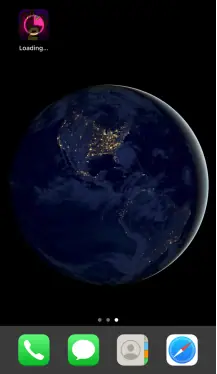
After the install prompt, the icon appears on the home screen with "Loading..." under it, as above. Wait for that to finish.
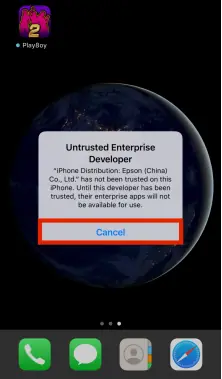
Tap the icon and iOS shows an "Untrusted Enterprise Developer" message. Tap Cancel. Then open Settings, go to General, and scroll to Device Management (newer iOS versions call it VPN & Device Management). You will see an entry under Enterprise App with a company name.
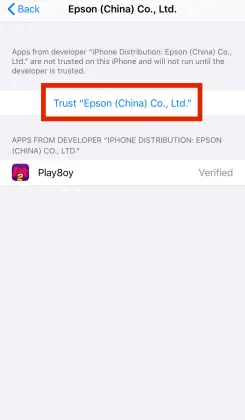
Open that entry, tap Trust, and confirm on the next pop-up. The app should then show "Verified", as in the screenshot above.
Two things are worth knowing before you do this. First, the company named on the certificate had no obvious link to the game when these screenshots were taken, which is common with these apps and is one reason Apple regularly revokes such certificates. When that happens the app stops opening and you need a fresh install. Second, iOS itself warns that trusting a developer "will allow any app from this enterprise developer to be used on your iPhone and may allow access to your data". Take that warning seriously, and consider using a spare phone.
Android installs come as an APK file from outside the Play Store. Our downloads page explains how that works in general; we do not host app files ourselves.
How the game ID and credit work
The flow is the same as on other agent-run apps:
- You ask an agent for a Play8oy ID and get a User ID and password.
- You pay the agent in ringgit, and they load the matching credit onto your ID.
- You play; your balance goes up and down in the app.
- To cash out ("cuci"), you ask the agent. They take the credit off your ID and pay you.
The app only keeps score. Every ringgit going in or out passes through the agent, so the agent is the part you are really trusting. If you decide to go ahead, you can ask for a Play8oy game ID through the provider this site works with.
Old pages quoted minimum top-up and withdrawal amounts. Those figures date from around 2018 and should not be relied on; ask the agent for today's rules.
Before you top up
- Log in with the new ID before paying. You should see a zero balance and no errors.
- Ask how withdrawals are handled, how long they usually take, and whether any bonus comes with a turnover requirement.
- Keep screenshots of your balance before and after each session.
- Do not share your ID or password with anyone else, and use one agent per ID.
- If the app suddenly stops opening on iPhone, the certificate has probably been revoked. Ask the agent for a new install; do not hand over your login to a stranger offering a "fixed" version.
Play small, and stop early
Play8oy's bright, fast lobby is designed to keep you tapping. Decide on an amount before you open the app, keep bets low, and log out when it is gone. You must be 18 or over, and online gambling is restricted in Malaysia, so these apps sit outside local rules and offer you little protection if something goes wrong. Our responsible gaming page has practical ways to set limits. If you still want to try it, request a Play8oy ID and look around with a zero balance first.
Collector's notes: questions readers ask
Is Play8oy connected to the Playboy brand?
Nothing we have seen suggests any link. The app spells its name Play8oy, and we know of no official website or official download link for it.
Can I create an account inside the app?
No. The login screen only has User ID and Password fields. The ID and password come from an agent.
Why does my iPhone say Untrusted Enterprise Developer?
The app is not from the App Store. It is signed with a company certificate, and iOS blocks it until you trust that certificate in Settings. Trusting it lets any app from that certificate run on your phone.
18+ only. Real-money games; online gambling is restricted in Malaysia. Never top up money you need, and stop if it stops being fun. Responsible gaming.